How to add a ‘Buy Now’ Button for Your Course in Squarespace
So, you want to add a "buy now" button to your course, event or program sales page in Squarespace, but you're not sure where to start. How do you take payments? Where does the buy now button actually direct to? How do you get a cart on your Squarespace site, so customers can checkout?
There’s actually a ton of different ways to do it, and it depends how and where you’ve set up your course. I’ll try to cover all of the options below so you can choose which is best for you!
Read through the different scenarios below and choose your adventure… 😄
Your Sales Page AND Course are Both Hosted on Squarespace
Your Course is Hosted with Squarespace Courses or Member Sites
Easy! If you’ve built out your course using Squarespace Courses or Member Sites, then you can use their built-in checkout and button.
Go anywhere on your site, add a new block and choose the Pricing Plan block.
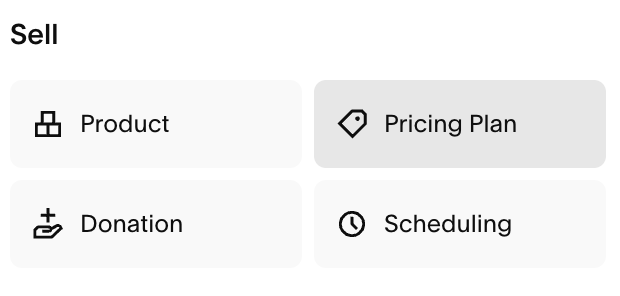
Double click on the block to access its settings.
In the pop up, select the Pricing Plan you want to ‘sell’ associated to your Course.
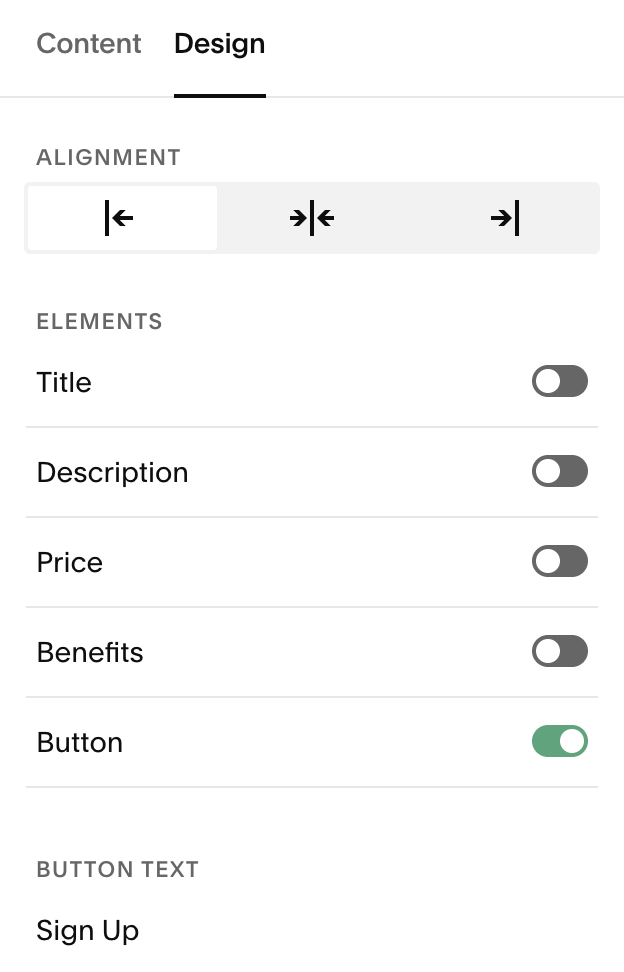
Then head to the Design tab to adjust the settings.
Tip! If you only want a Buy Now button to show, toggle off all of the other elements.
Your Course is a Password Protected Page in Squarespace
You can actually use Squarespace e-commerce and utilize the built-in Squarespace checkout and add to cart/buy now button in this scenario.

The easiest way to do this is to add a digital product with Squarespace e-commerce. You can then upload a PDF that contains a welcome message and the link and password to their password protected course page as the "digital product". Then when they checkout this will automatically be emailed to them and they can follow the instructions to sign into their password protected course area.
You will need to actually set up a “Shop” page to add your product. This Shop doesn’t have to be live or behave like an e-commerce store. You could add it to your “not-linked” pages section and make sure it isn’t visible to website visitors.
On your actual sales page, you could include the add to cart/buy now button by adding a “Product” block. From there, you connect your specific product and choose to just display the “add to cart” button!
👉 How to add a Shop to Squarespace - Step by Step Walkthrough (7.1 and 7.0)
Want to speed things up with a beautifully designed shop page template? Check out our shop page templates for Squarespace 7.1:




Your Sales Page is on Squarespace but Your Course is Hosted Somewhere Else
A very common scenario! There's multiple options here depending on your course platform.
When I say your course is “hosted” somewhere else, or refer to your "course host platform" I’m talking about course platforms like Teachable, Kajabi, Podia, or basically anywhere else that isn’t on your Squarespace site!
Link Directly to Your Course Hosts Checkout
Your course host platform should have a way to actually purchase the course (depending on the host, but in most cases they will!).
A simple option is to add a button blockon Squarespace to your sales page that links directly to this checkout page.
If you're not sure where to find the right link for this checkout page, ask your course host platform support. They should be able to guide you on the right link to use, and/or if linking directly to the checkout is a possibility.
This option is great because it’s so easy - utilizing the built-in options for both platforms you’re using.
Embed Your Course Hosts Buy Now Button
Your course host may have an option to embed a “Buy Now” button on your site.
They will give you a code that you can add to your Squarespace site in a code block. This will put a button on your Squarespace site that leads them to the checkout for your course.
Much like the option above, you’re using the checkout that is managed by your course host platform, and will navigate away from Squarespace.
This is similar to the option above but instead of using a Squarespace button, you embed the button with a code. You will need to use a snippet of code but it should be really easy. Otherwise, the process is very similar and the end result is generally the same. Though, it may make the customer transition from the sales page to your checkout a bit more seamless, depending on your platform.
Use a Third Party Checkout Service
There are platforms out there that are solely used for providing carts and checkouts.
In this instance I would probably see what your course host platform can do before using this option. This requires learning another new platform so it's a bit more advanced, and often these cart platforms are expensive. This is a good option for people who need a really advanced cart/checkout service.
Usually these checkout platforms can integrate with most other platforms, so you can go from sales page, to checkout, to course host seamlessly. But it’s so important to check that whatever checkout platform you’re considering integrates with Squarespace (aka your sales page software) and your course host software before you invest in it, otherwise you will have a tough time linking everything up, and it’s probably not worth it!
Use Squarespace e-Commerce and Link to Your Course Platform via an Integration or Zapier
This would only be used if you really want to keep your transactions and checkout in Squarespace.
You would create an e-commerce Shop in Squarespace
Add “digital products”
Upload a PDF with a welcome message (it doesn’t really matter, we use this “digital product” so we can use Squarespace e-commerce as the checkout)
Then the next, extra step would be linking that transaction to enrol customers to your course platform.
If you have a course with limited people, you could enroll your customers in the course host platform manually after they purchase via Squarespace.
If you have lots of people, you will need to figure out some sort of integration to do this automatically.
Some course platforms actually integrate with Squarespace directly, so you could do this easily - but most don’t.
In this case, you could use Zapier to link the checkout in Squarespace to the enrollment in your course host.
The Squarespace and Zapier integration only works if someone fills out a form (they don't have any triggers for purchases/checkouts) so that makes this a bit of a long winded process, as you will have to direct your customer to fill out a form after they purchase, which would then trigger the zap to connect them to their course platform. You could direct them to that form in your PDF digital download.
That should cover all of the ways you can add a buy now or purchase button to your course sales page in Squarespace. There’s pretty much an option for every different situation, which is great! Hopefully this post helps you get a buy now button set up on your Squarespace page, so you can start enrolling customers into your course!
Want more selling tips? Check out these posts:
The Best Platforms for Selling Digital Products in 2026
Crafting the Perfect Sales Page on Squarespace
How to Leave Etsy and Start a Shop with Squarespace (and why you should!)
How I Market + Sell Digital Design Products
If you liked this post, Pin it to Pinterest! 👇🏻