Why you Should use Squarespace for Your Sales Page
Sales Pages, or Landing Pages, are basically long, detailed pages that promote a product, course, or service you’re selling. They’re super common in the online business world, so you probably already know exactly what I’m talking about when I say “Sales Page”.
We’re huge believers in DIY around here, so we think a good sales page builder needs to be easy to use and DIY friendly. Enter: SQUARESPACE! Squarespace is our fav web design builders for SO many reasons, and that includes building Sales Pages!
And while there are plenty of dedicated landing page builders out there, that doesn’t necessarily mean you need another platform, subscription, and login to manage. If your website is already on Squarespace, you can build a beautiful, strategic sales page right inside the website you already have.
Just like with a website, there’s a time and a place for a custom design, and that’s usually down the track when you have a bit more money and experience under your belt.
We generally only recommend using Squarespace for your sales page design if you already have your site on Squarespace, or, if you’re planning to build your site with Squarespace eventually. If you are hosting your website somewhere else (eg. Wordpress, Wix, Showit, etc) we would recommend building your sales page there! As much as we love Squarespace, using what you already have just makes sense.
So, here are the main reasons we think Squarespace is the perfect platform to build your new sales page!

1. You Don’t Have to Learn a new Platform
If you’re already using Squarespace, this is a HUGE benefit to building your sales page in the same place.
Every new platform has a learning curve, even if you are super tech savvy, so using what you already know will really speed up the process and make long term management so much easier!
There’s no new dashboard to figure out, no completely different editor to learn, and no extra integrations or systems to wrap your head around.
If you already know your way around Squarespace, you can pretty much get straight into building. And when you need to come back later to update your pricing, tweak your copy or add a new testimonial, everything is exactly where you expect it to be.
2. You’ll Save Money
As a small business owner or new-ish entrepreneur, you know that managing your money and not overspending is so important. There are so many shiny new things in the online space that claim to be the best of the best. And heck, maybe they are the best of the best, but realistically, you can’t afford everything right now.
Using your existing Squarespace site to add a sales page is a no-brainer when it comes to budget because there’s no separate sales page platform subscription to add to your monthly expenses.
You’re already paying for Squarespace, so why pay for another platform just to host one or two sales pages?
All you need to add is a new page, and luckily, Squarespace doesn’t charge you for pages! This keeps your setup simpler and our monthly expenses lower - win!
3. Design Freedom
If you’ve designed anything on Squarespace before, you know that, while it may take a while to get used to, it’s pretty friggin awesome. You can do SO much with it, it’s super customizable, and you can even integrate custom code if you want to get a little fancy!
With Squarespace 7.1, you’ve got loads of freedom to play around with layouts, colors, images, videos, buttons, FAQs, testimonials and all the different sections you might want to add to your sales page.
Compare that to some sales page or landing page specific builders, which can feel pretty clunky or overly simplified, and Squarespace gives you a lot more freedom to make your page feel like you.
Plus, if your main website is already on Squarespace, it’s much easier to keep everything feeling cohesive and on-brand.
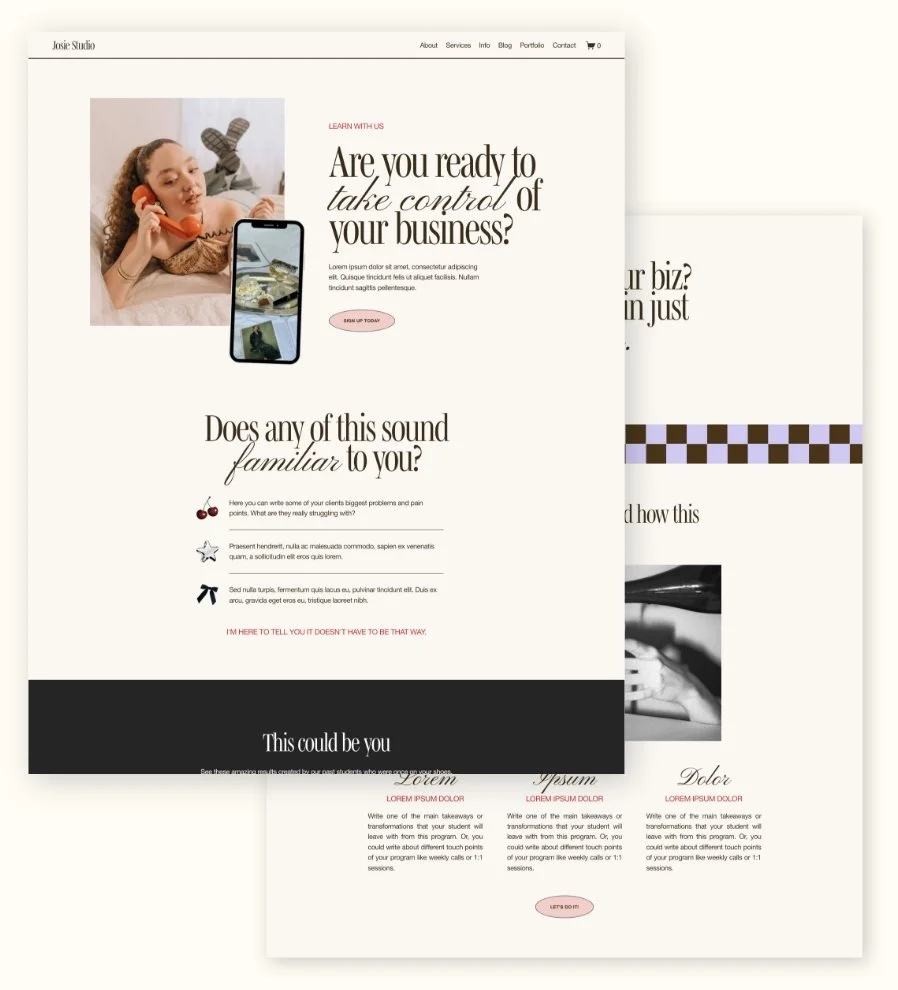
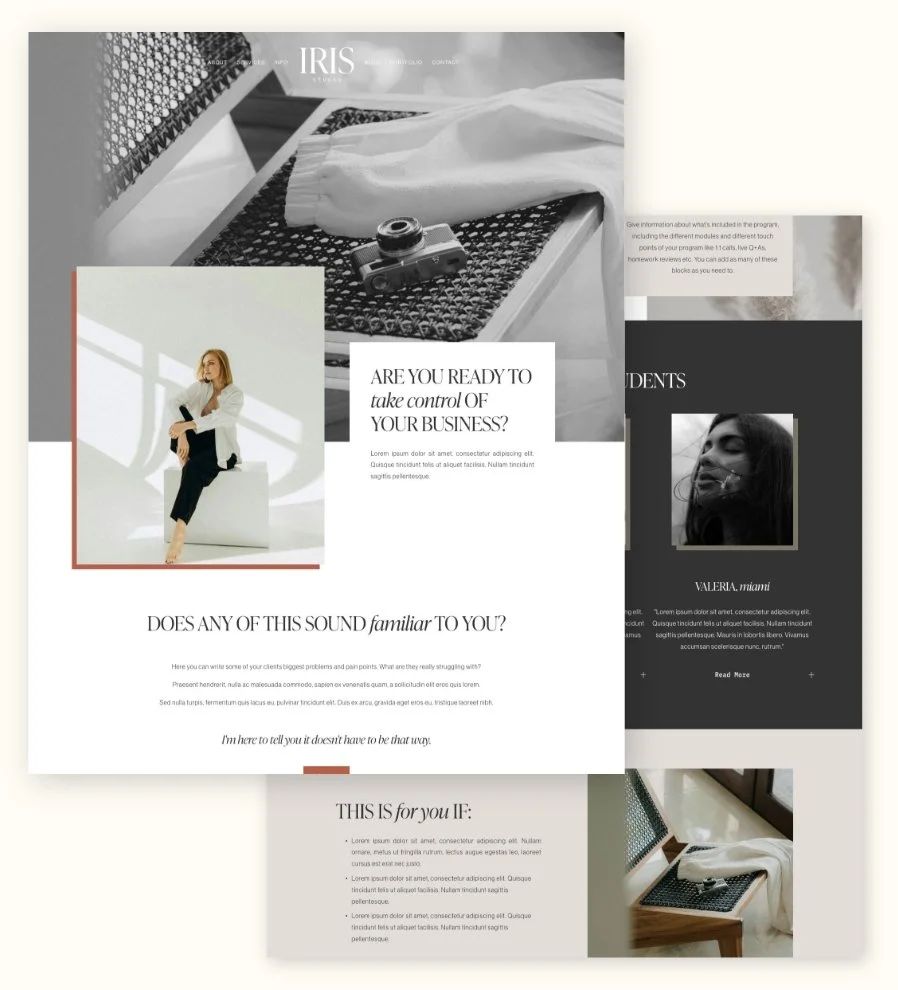
And if you love the idea of building your sales page in Squarespace but don’t necessarily want to figure out the strategy and layout from scratch, that’s exactly what our Squarespace Sales Page Templates are for!
They can be purchased as a standalone add-on page that we’ll install directly into your existing Squarespace 7.1 site. The strategy and page layout are already mapped out for you, so you can skip the blank-page stage and jump straight into customizing the colors, fonts, images and copy to make it your own.




4. Multiple Sales Pages
Because Squarespace is a whole website builder, it doesn’t charge you more for pages (I know, we’ve already covered this!) but that also means you can build as many sales pages or sales page variations that you want to! Now that’s pretty awesome.
Some landing page softwares only let you have 1 sales page at a time or you have to pay for more. With Squarespace, it’s as many as you want with no limits. This is GREAT if you have lots of products!
5- Everything All-in-one
This one’s a bit of a no-brainer, but the ease of not having to take on yet another platform, and being able to keep everything in one place is a huge advantage.
As online business owners, we are constantly juggling so many different platforms and systems, honestly, it’s exhausting! Whenever I can consolidate platforms, I do!
With Squarespace, your sales page can live right alongside the rest of your website, blog, email signup forms, products, scheduling and other content, so there’s less bouncing between different logins and dashboards.
And even if your checkout, course or booking system lives somewhere else, your sales page can still sit neatly on your main website and simply send people where they need to go.
One less platform to manage? we’ll take it!
And that’s why we’re such big fans of using Squarespace for sales pages!
If your website is already on Squarespace, it just makes sense to keep things simple, save yourself another subscription, and build your sales page right where the rest of your website already lives.
If you want a little head start, check out our Squarespace Sales Page Templates for strategically designed sales pages, ready to customize!
And if you’d rather build your sales page completely from scratch, check out our How to Create a Sales Page or Landing Page in Squarespace guide for the full technical tutorial.
Loved this post? Learn more here! 👇
The 5 must-haves on your Sales Page
Crafting the Perfect Sales Page on Squarespace
How to add a ‘Buy Now’ Button for Your Course in Squarespace
7 Common DIY Website Design Mistakes to Avoid
The Best Free and Affordable Tools for Small Business Owners
If you liked this post, Pin it to Pinterest! 👇🏻